
Scene Environment
Environment settings shape the world around the scene content. Use them to adjust the background and surrounding feel so the scan or model sits in a clearer, more comfortable viewing context.
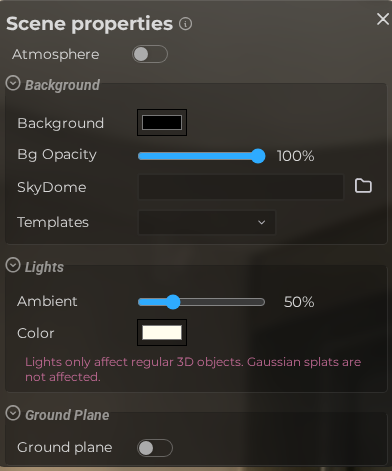
LCC viewer
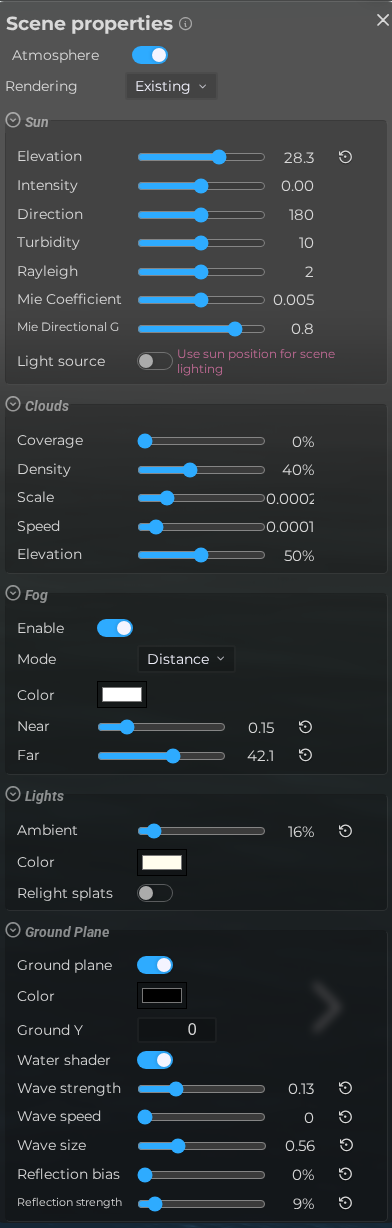
 Steps: Expand scene settings section → Select the Environment scene section → Expand all collapsed fieldsets (e.g. the clouds section which is collapsed when at default values)
Interface elements
| Element | Details |
|---|---|
 | Atmosphere Enable the physically-based sky shader (sun, atmosphere, and clouds) instead of a static skydome image. Default: Off |
 | Sky rendering Choose the existing procedural sky or physical atmospheric scattering on supported VLAM WebGPU viewers. Default: existing |
Sun
| Element | Details |
|---|---|
 | Sun Elevation Set the vertical angle of the sun in the sky, from -90° (below horizon) to 90° (directly overhead). Default: 0.4 |
 | Editor Scene Properties Environment Sun Intensity Documentation for Editor Scene Properties Environment Sun Intensity. Default: 0 |
 | Sun Direction Set the horizontal compass direction of the sun, from 0° to 360°. Default: 180 |
 | Turbidity Control atmospheric haze: low values give a clear sky, high values a more hazy appearance. Default: 10 |
 | Rayleigh Adjust Rayleigh scattering, which controls the blue tint of the sky and sunset color. Default: 2 |
 | Mie Coefficient Set the amount of Mie scattering, which affects haze and sun glow intensity. Default: 0.005 |
 | Mie Directional G Control the directionality of Mie scattering, affecting how tight the sun glow appears. Default: 0.8 |
 | Sun Light Source Enable a directional light in the scene synchronized with the sun position for realistic shading. Default: On |
Clouds
| Element | Details |
|---|---|
 | Cloud Coverage Set how much of the sky is covered by clouds, from 0 (clear) to 100%. Default: 0 |
 | Cloud Density Adjust the opacity and thickness of cloud formations. Default: 0.4 |
 | Cloud Scale Control the scale of the cloud noise pattern — larger values produce broader cloud formations. Default: 0.0002 |
 | Cloud Speed Set the speed at which clouds move across the sky. Default: 0.0001 |
 | Cloud Elevation Adjust the apparent height of the cloud layer in the sky. Default: 0.5 |
Fog
| Element | Details |
|---|---|
 | Enable Fog Toggle scene fog, which fades distant objects into a color to simulate atmospheric depth. Default: Off |
 | Fog mode Choose legacy distance fog, animated height fog, or volumetric fog where collision geometry is available. Default: distance |
 | Fog Color Set the color that distant objects fade into when fog is enabled. Default: #aaaaaa |
 | Fog Near The distance from the camera at which fog begins to appear. Default: 1 |
 | Fog Far The distance at which fog reaches full opacity and objects are completely hidden. Default: 50 |
Lights
| Element | Details |
|---|---|
 | Ambient Light Set the intensity of the ambient light that illuminates the scene uniformly from all directions. Default: 0.5 |
 | Ambient Light Color Choose the tint color for the ambient light. Default: #fffdee |
 | Splat Lighting Apply ambient light to gaussian splats, affecting their brightness and shading. Default: Off |
Ground Plane
| Element | Details |
|---|---|
 | Ground Plane Toggle the ground plane, a flat surface rendered below the scene. Default: Off |
 | Ground Color Set the fill color of the ground plane. Default: #223322 |
 | Ground Y Set the vertical position (Y coordinate) of the ground plane. Default: 0 |
 | Water Shader Apply an animated water shader to the ground plane for a realistic water surface effect. Default: Off |
 | Wave Strength Set the amplitude of the water surface distortion. Default: 0.15 |
 | Wave Speed Control how fast the water waves animate. Default: 0.003 |
 | Wave Size Set the scale of the water wave pattern. Default: 20 |
 | Reflection Bias Adjust the reflection offset to fine-tune how the water surface reflects the scene. Default: 0.1 |
 | Reflection Strength Set the intensity of the water surface reflections. Default: 0.9 |
LCC viewer interface elements
| Element | Details |
|---|---|
 | Lights Note Informational note about splat lighting support for this viewer. |
 | Background Color The solid background color shown when no skydome image is set. Default: #000000 |
 | Background Opacity Set the transparency of the background color, from fully transparent to fully opaque. Default: 1 |
 | Skydome Upload or link a panoramic image (JPG/PNG/GIF) used as the scene background skydome. |
 | Skydome Templates Choose from a set of pre-made skydome images to quickly set the scene background. |