
Scene Properties – Camera – First Person
Configure the first-person walking camera: mode, starting position, movement, and teleport options.
LCC viewer
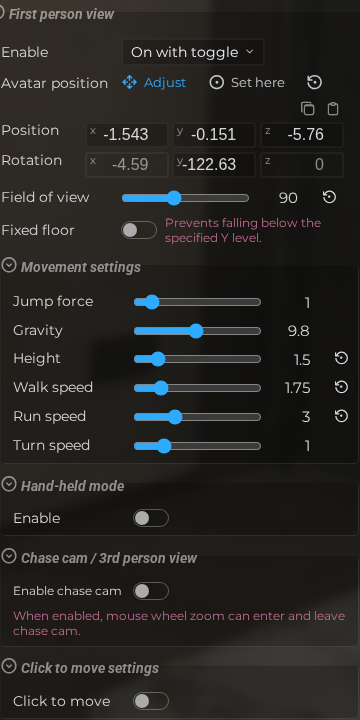 Steps: Expand scene settings section → Select the Camera scene section → Expand all collapsed fieldsets
Interface elements
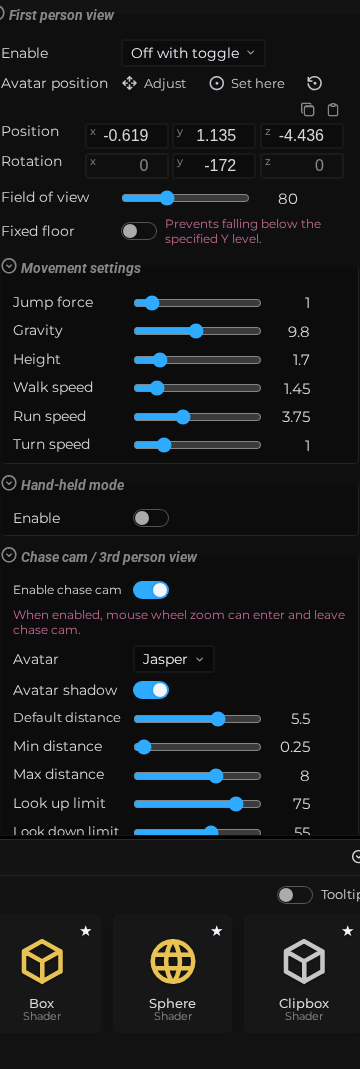
First person view
| Element | Details |
|---|---|
 | First Person Mode Enable first-person walking mode: always on, toggled on by default, or toggled off by default. Default: off |
 | Initial Position Set or adjust the starting position of the first-person avatar in the scene. |
 | Field of View Set the horizontal field of view angle for the first-person camera. Default: 80 |
 | Fixed Floor Lock the avatar to a fixed floor height so it cannot fall below a set Y level. Default: Off |
Movement settings
| Element | Details |
|---|---|
 | Jump Force Set the upward impulse applied when the avatar jumps. Default: 1 |
 | Gravity Set the downward gravitational force applied to the first-person avatar. Default: 9.8 |
 | Height Set the eye-level height of the first-person avatar above the floor. Default: 1.7 |
 | Walk Speed Set the movement speed of the first-person avatar while walking. Default: 1.45 |
 | Run Speed Set the movement speed of the avatar while running (holding sprint). Default: 3.75 |
 | Turn Speed Set the rotation speed when the avatar turns left or right. Default: 1 |
Chase cam / 3rd person view
| Element | Details |
|---|---|
 | Enable Chase Cam Allow mouse wheel zoom to switch between eye view and chase view. Default: Off |
 | Editor Scene Properties Camera First Person Chase Default Distance Documentation for Editor Scene Properties Camera First Person Chase Default Distance. Default: 5.5 |
 | Editor Scene Properties Camera First Person Chase Min Distance Documentation for Editor Scene Properties Camera First Person Chase Min Distance. Default: 0.25 |
 | Editor Scene Properties Camera First Person Chase Max Distance Documentation for Editor Scene Properties Camera First Person Chase Max Distance. Default: 8 |
 | Editor Scene Properties Camera First Person Chase Look Up Limit Documentation for Editor Scene Properties Camera First Person Chase Look Up Limit. Default: 75 |
 | Editor Scene Properties Camera First Person Chase Look Down Limit Documentation for Editor Scene Properties Camera First Person Chase Look Down Limit. Default: 55 |
 | Editor Scene Properties Camera First Person Chase Recovery Speed Documentation for Editor Scene Properties Camera First Person Chase Recovery Speed. Default: 6 |
 | Editor Scene Properties Camera First Person Chase Pull In Speed Documentation for Editor Scene Properties Camera First Person Chase Pull In Speed. Default: 12 |
Click to move settings
| Element | Details |
|---|---|
 | Teleport Enable click-to-teleport navigation for the first-person avatar. Default: On |
 | Teleport Trigger Choose whether teleportation is triggered by a single tap or a double tap. Default: Off |
 | Teleport Cursor Show a cursor indicator at the teleport destination while hovering. Default: On |