
Scene Properties – Camera – Orbit
Configure the orbit (3rd-person) camera: position, auto-rotate, movement speed, depth-of-field, and movement constraints.
LCC viewer
 Steps: Expand scene settings section → Select the Camera scene section → Expand all collapsed fieldsets
Interface elements
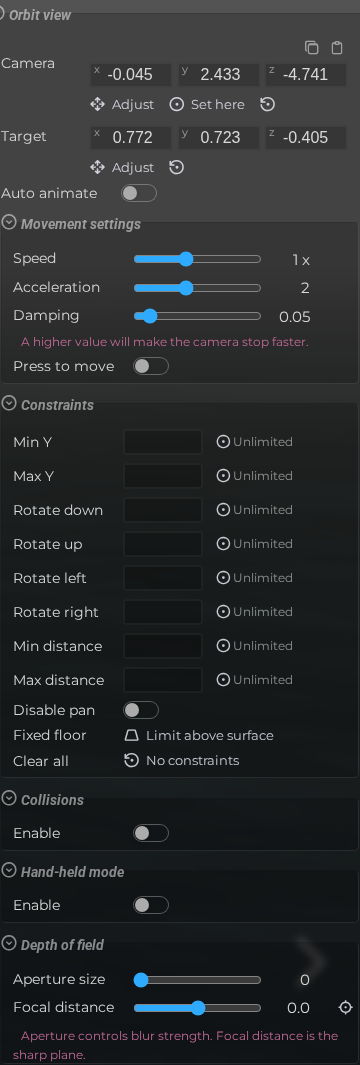
Orbit view
| Element | Details |
|---|---|
 | Camera Position Set or reset the default orbit camera position and target for the scene. |
 | Auto Rotate Automatically rotate the camera around the scene target when idle. Default: Off |
 | Move Speed Adjust how fast the camera responds to pan and zoom input. Default: 2 |
 | Move Acceleration Set how quickly camera movement reaches its maximum speed. Default: 2 |
 | Damping Control the inertia effect applied after camera movement stops. |
 | Editor Scene Properties Camera Orbit Press To Move Forward Documentation for Editor Scene Properties Camera Orbit Press To Move Forward. |
 | Min Y Set the minimum Y position the camera target is allowed to reach. |
 | Max Y Set the maximum Y position the camera target is allowed to reach. |
 | Min Vertical Angle Set how far down the camera can rotate (tilt limit). |
 | Max Vertical Angle Set how far up the camera can rotate (tilt limit). |
 | Min Horizontal Angle Set the leftward rotation limit for the orbit camera. |
 | Max Horizontal Angle Set the rightward rotation limit for the orbit camera. |
 | Min Distance Set the minimum zoom distance between the camera and its target. |
 | Max Distance Set the maximum zoom distance between the camera and its target. |
 | Disable Pan Prevent the viewer from panning the camera target. |
 | Limit Above Surface Reset constraints to sensible defaults that keep the camera above the scene surface. |
 | No Constraints Clear all orbit camera constraints, restoring full freedom of movement. |
 | Enable Collision Turn orbit camera collision on or off so the camera respects scene geometry while moving. Default: Off |
 | Enable Handheld Motion Add handheld-style motion to the orbit camera for a less static shot. Default: Off |
 | Aperture Size Set the depth-of-field aperture; larger values create a stronger bokeh blur. Default: 0 |
 | Focal Distance Set the distance from the camera at which the scene is in sharp focus. Default: 0 |