
Marker camera
Use the Camera section to define the viewpoint for focused markers. Set this when you want a fixed entry angle, distance, or composition.
Use Adjust when you want to fine-tune the marker camera from the current editor view. Set here stores the current camera position on the marker, and Reset clears the saved camera values back to a default state.
The Position fields show the saved camera coordinates for the marker. On focus controls what happens when the marker receives focus, and the FOV slider changes the field of view for that focused camera state.
Movement constraints is collapsed in the screenshot. Open it when the focused marker view should limit how far or how freely the visitor can move after the camera is applied.
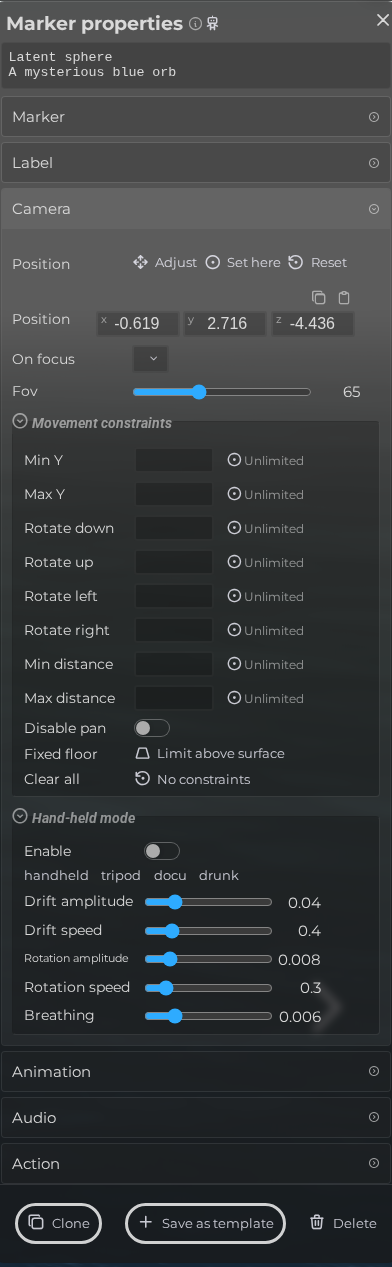 Steps: Expand markers section → Select the first marker in the list to open the properties panel → Open the Camera section → Expand all collapsed fieldsets in the Camera section
Interface elements
| Element | Details |
|---|---|
 | Positioning actions Activate transform gizmo, set camera to current view or reset camera. |
 | Position Modify the camera position manually. |
 | Mode Keep the current camera mode, or switch to orbit or first person when this marker receives focus. |
 | Field of View (FOV) Configure the field of view (fov) |
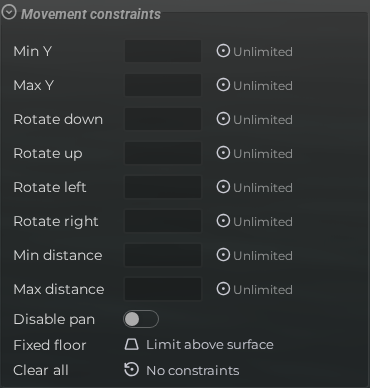 | Marker Camera Constraints Restrict camera movement when this marker is focused. |
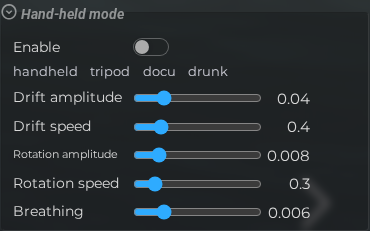 | Hand-held Mode Override the scene hand-held camera settings for this marker. |
 | Enable Override scene hand-held settings for this marker. |
 | Hand-held Preset Apply a preset profile such as handheld, tripod, documentary, or drunk for this marker. |
 | Drift Amplitude Translation drift amplitude. |
 | Drift Speed Translation drift speed. |
 | Rotation Amplitude Rotation shake amplitude. |
 | Rotation Speed Rotation shake speed. |
 | Breathing Breathing motion amplitude. |