
Marker Label
The Label section controls the text label attached to the selected marker. Use it when the marker needs a visible caption, or when the caption needs to sit a little differently around the marker in the scene.
Hide label turns the label off without removing the marker itself. This is useful for markers that should still be interactive, but do not need text on screen all the time.
Scale changes the label size, while Offset Y and Offset X move the label vertically or horizontally relative to the marker. Line adjusts the small connector line between the marker and its label, so the text can stay readable without feeling detached from the point it describes.
The Image label group is collapsed in the screenshot. Open it when the marker should use an image-based label instead of relying only on text.
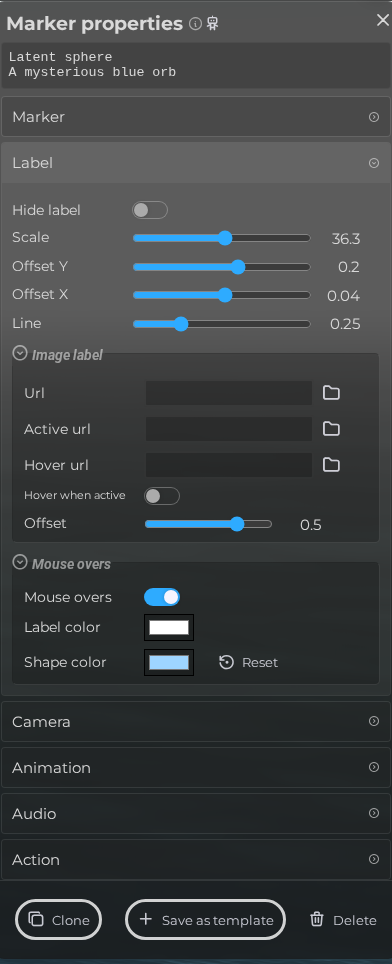 Steps: Expand markers section → Select the first marker in the list to open the properties panel → Open the Label section → Expand all collapsed fieldsets in the Label section
Interface elements
| Element | Details |
|---|---|
 | Hide label Hide the label. |
 | Scale Change the size of the label. |
 | Offset Y The vertical positioning of the label. |
 | Offset X The horizontal positioning of the label. |
 | Line Configure the connector line size of the label. |
 | URL Choose an image to use as a label. |
 | Active Url Choose an image to use as a label when the marker is active. |
 | Hover Url Choose an image to use when the mouse is over the label. |
 | Hover when active Allow the hover image to replace the active image while the marker is focused. |
 | Image Offset Configure the vertical image offset for the image. |
 | Editor Marker Properties Label Mouseover Enable Documentation for Editor Marker Properties Label Mouseover Enable. |
 | Editor Marker Properties Label Mouseover Label Color Documentation for Editor Marker Properties Label Mouseover Label Color. |
 | Editor Marker Properties Label Mouseover Shape Color Documentation for Editor Marker Properties Label Mouseover Shape Color. |