
Marker Action
The Action section defines what should happen when a visitor interacts with the selected marker. Use it to make a marker respond to clicks, proximity, focus changes, or other viewer events.
The trigger checkboxes decide when the action can run. Scene click reacts to a click in the scene, Menu click reacts from the marker menu, Proximity can run when the visitor gets close, and Focus can run when the marker becomes the active point of interest.
Radius is used with proximity behavior and sets the distance around the marker where the action can trigger. The Action dropdown chooses the behavior to run; in the screenshot it is set to focus on a marker. The Marker dropdown chooses the target for that behavior, with Self meaning the selected marker targets itself.
Mouse overs is collapsed in the screenshot. Open it when hover behavior needs to be configured separately from clicks, focus, or proximity.
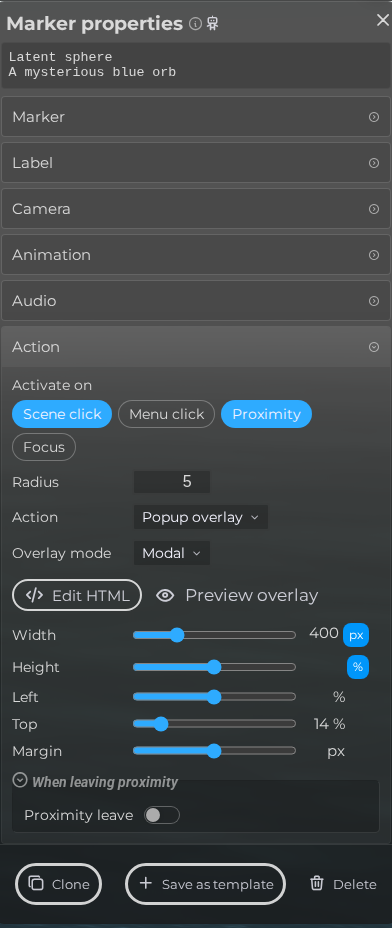 Steps: Expand markers section → Select the first marker in the list to open the properties panel → Open the Action section → Expand all collapsed fieldsets in the Action section
Interface elements
| Element | Details |
|---|---|
 | Editor Marker Properties Action Triggers Documentation for Editor Marker Properties Action Triggers. |
 | Scene Click Run the action when the marker is clicked in the scene. |
 | Menu Click Trigger action when clicking on the marker in the menu. |
 | Within radius Run the action when the camera comes within this distance of the marker. |
 | Run action on focus Run the action when the marker receives focus. |
 | Proximity Radius Configure the proximity radius for the marker Action. |
 | Action Choose the action type for the marker Action. |
 | Height Modify the popup overlay height in pixels or percentual. |
 | Left Modify the popup overlay left. |
 | Top Modify the popup overlay top. |
 | Margin Create a margin around the popup overlay content. |
 | Url When action type is link, configure the url to open. |
 | On leave What happens when the camera moves away from the marker again, beyond this distance. |