
Marker Animation
The Animation section controls marker-driven movement and focus transitions.
Playback animation sets the camera tween style and timing. Use Tween for easing, Duration for speed, Pause for hold time, and Skip to disable playback when needed.
The Advanced area separates behavior that happens On focus from behavior that happens On unfocus. Each row can enable a gizmo for editing and includes an Add button for attaching additional animation steps or actions to that moment.
Short, calm transitions usually work best for orientation. Longer pauses or extra steps are more useful when the marker is part of a guided tour or a sequence that needs the viewer to linger.
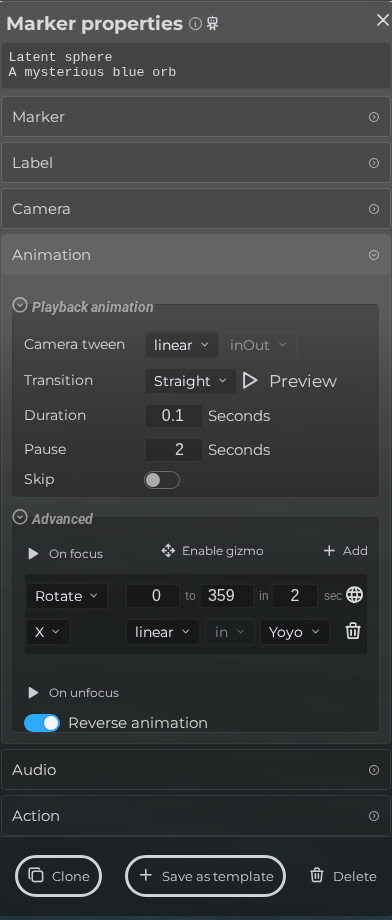 Steps: Expand markers section → Select the first marker in the list to open the properties panel → Open the Animation section → Expand all collapsed fieldsets in the Animation section
Interface elements
| Element | Details |
|---|---|
 | Editor Marker Properties Animation Camera Tween Documentation for Editor Marker Properties Animation Camera Tween. |
 | Editor Marker Properties Animation Camera Path Documentation for Editor Marker Properties Animation Camera Path. |
 | Editor Marker Properties Animation Camera Duration Documentation for Editor Marker Properties Animation Camera Duration. |
 | Editor Marker Properties Animation Camera Pause Documentation for Editor Marker Properties Animation Camera Pause. |
 | Editor Marker Properties Animation Camera Skip Documentation for Editor Marker Properties Animation Camera Skip. |
 | Editor Marker Properties Animation Focus Animation Controls Documentation for Editor Marker Properties Animation Focus Animation Controls. |
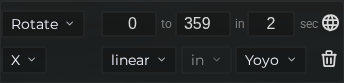 | Editor Marker Properties Animation Focus Rotate X Documentation for Editor Marker Properties Animation Focus Rotate X. |
 | Editor Marker Properties Animation Reset Animation Controls Documentation for Editor Marker Properties Animation Reset Animation Controls. |